Showing posts with label Facebook. Show all posts

Tuesday, October 1, 2013

Facebook's New Pages To Watch Section


Have you seen this new section in the admin area of your Facebook Page yet?
Facebook has rolled out yet ANOTHER great new feature for Small to Large Businesses and Communities, and this one is going to be a hit!


This allows you to track (or watch) the progress of other pages and compare it with your own page's insights. 

Wednesday, July 31, 2013

What are your Fans worth to YOU?


As a brand and social media specialist, it is expected of me in some sense that when I like or support a brand I will share their posts, product and ideas across social media. When I see something that piques my interest it either ends up here on my blog, or elsewhere on Twitter and Facebook. I try to reward and encourage brand accounts, especially those belonging to small businesses to keep their momentum building in their social space.

But there are other people out there, not like me, who don't actively look for opportunities to share and engage with brands. A lot of business owners who've yet to embrace the social sphere write the idea off entirely because they feel that a fan liking their page on Facebook or re-tweeting a post on their Twitter feed has no bearing on sales. Well I'm sorry, business owner, but you're WRONG. You're so so so wrong.

On Facebook alone, the basic act of a fan "liking" your business page is valued at $174.17.


Tuesday, July 30, 2013

Social Media Do's and Don'ts: An Un-Official List


In the world of social media there are a bevvy of unspoken (or oft-spoken, in some cases) rules. Some are designated for users en masse and some are specifically for brands.

Just like the rules we were taught as children (always hold the door open for strangers, don't put your elbows on the table, say "excuse me" after your sneeze) these rules exemplify that we, as social networkers, recognize that other people inhabit these planes and we should be respectful of them.

Here's a list of the big Do's and Don'ts you should keep in mind:


Friday, July 26, 2013

My Facebook Page Reach Has Declined! Guess What? It Doesn't Matter!


So your Facebook Page's reach has dropped... not as many of your fans (and even less non-fans) are seeing your posts! It’s not the end of the world, I promise!

Lately I have seen many Facebook Page owners (mostly bloggers and small businesses) complaining or posting about the decline in the reach of their posts. Although this may have an initial significant impact in your growth, it doesn't impact the way your fans interact with your page.

Here are five things you can try, or remember, when it comes to your Facebook Page:

Monday, April 8, 2013

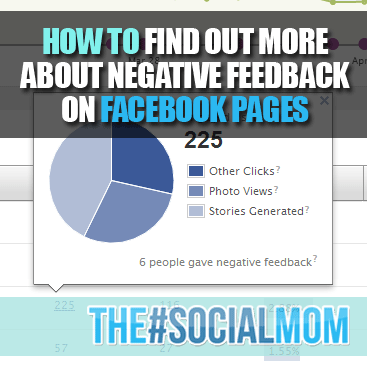
How to get more information about Negative Feedback on Facebook Pages


Negative Feedback on your Facebook Page Posts? Here’s how you figure out the when, where and how!

As Facebook develops more and more ways for us to gain insight (pun!) on Facebook Pages we start to see more and more relatable information… user engagement, how  they engaged and when… using this data we can then determine how to create content that will work even better for the target audience and create even more engagement.

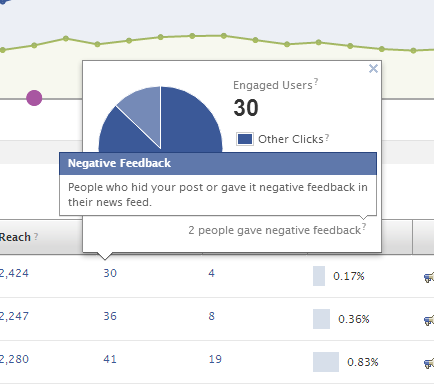
The other side of the coin, although painful, is also very important. If you have been following closely enough you may have come across something that looks like this:

Negative Feedback on your Page


So we know that we are getting negative feedback, but how do we figure out what it is? Are they simply hiding the post? Hiding your page’s updates from their newsfeed? Un-Liking the page?
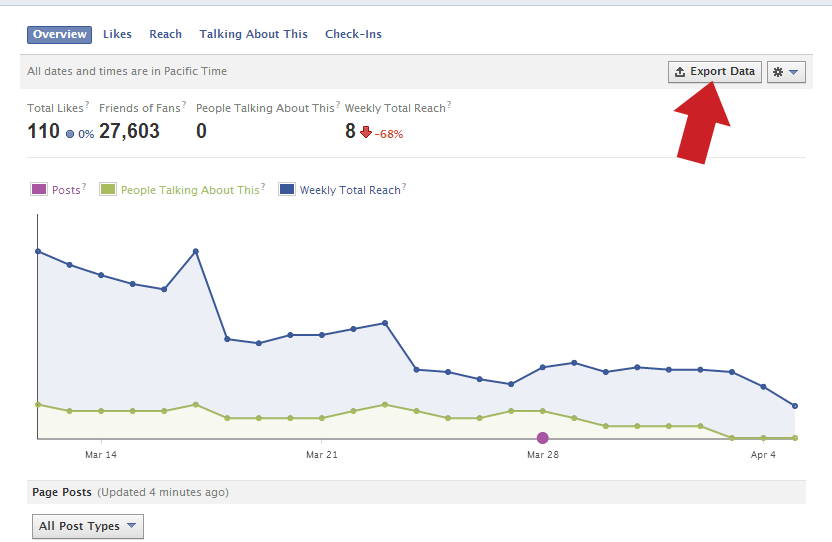
As I always encourage my clients to dig deeper into their data, the key tool in analyzing data for Facebook is and has long since been the “Export Data” option.

How to Export Data


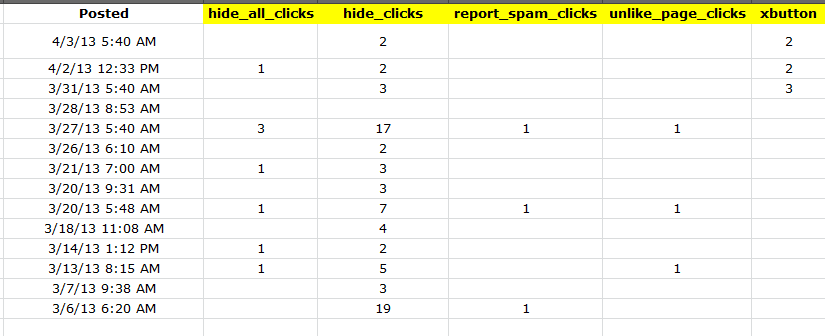
If you export data into an Excel Spreadsheet, the tabs at the bottom indicate what each page of data represents. A few pages in you will find the “Lifetime Negative Feedback” tab. This holds the key! Here you will find exactly which posts (in the time frame in which you exported the data) had negative feedback and how much. This tool can help you analyze the overall negative impression your posts may be having on your audience so you can augment your approach (if needed).

Analyzing the Data


There are five “types” of negative feedback:

1)      Hide All Clicks (in which the viewer of the post opts to hide all activity coming from your page from their newsfeed.)

2)      Hide Clicks (in which the viewer of the post opts to hide only the specific post they’re viewing at that time)

3)      Report Spam Clicks (in which the viewer of the post opts to report the post as spam – this one is not good, but also doesn’t seem to carry too much weight with Facebook unless it’s happening regularly)

4)      Unlike Page Clicks (in which the viewer of the post opts to visit the page and Un-Like it. Not good!)

5)      X Button (from what I understand this is when the viewer of the post x’s the post on their newsfeed to drop down options 1, 2 and 3, but takes no action.)


By analyzing the data around these types of activity you can determine how in-effective overall your post was… also keep in mind that sometimes pushing the limits can be overwhelmingly good for your page, even if you do offend a few people, so keep the new likes or engagement ratio in mind when you’re analyzing your negative feedback data. Although it’s important to keep things like Un-Likes to a minimum to retain followers, if in comparison to your overall growth it’s not holding a significant weight then you should be okay. 

Hope this helped! If you have any questions regarding Facebook Pages, Data Analytics or Social Media in general, please feel free to comment and I will get back to you ASAP!

Sincerely,
The#SocialMom

Wednesday, February 27, 2013

How To Help Your Friends with Social Pages

So your good friends owns a small business locally, and (since you're an awesome friend!) you want to do everything you can to help increase their traffic, and subsequently their brand visibility.

Well there is a lot you can do to help their page(s) grow! In fact, a few warm recommendations from you go a long way!

It's easy enough to like every one of their posts, but is that really enough? No. Not really.

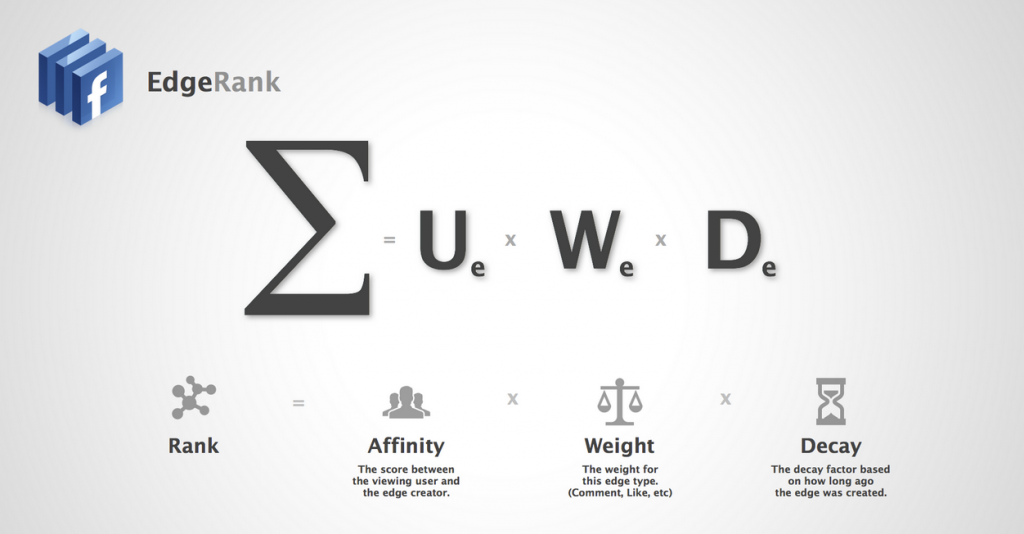
In fact, just "liking" a facebook status update, photo or event isn't enough to get the ball rolling, same goes with "favouriting" a tweet. When considering how to best boost traffic for a friend's (or your own) page, the best way is to consider the Facebook EdgeRank system.

Here's what it looks like broken down in a fairly simple formula:

(click to enlarge)


(And you can go here if you'd like to learn more about exactly what EdgeRank is!)

So, considering the EdgeRank system, how do we best interact with these pages to ensure our other friends see the story in their news feed?

1) The more interaction, the better! -- Liking a page is good, but make sure you do more than that. Comment on a status update, Share a photo. How you interact means more than when you interact (Weight) so try to remember this:

A Comment weighs more than a Like
A Share weighs more than a Comment
A Comment & a Share weigh the most of all!

2) Make sure you're up to date -- Although you may think reviving an older post would be nice to do, because of the "decay" aspect of the EdgeRank algorithm it makes more sense to promote newer posts as they're more likely to be re-posted.

3) Share the most valuable content first! - I'm not talking about gold buying ads here, I'm talking about stuff that is actually good content. The real shareable things, that when you post them to your wall, your friends are most likely to comment on & repost again!

4) Calls To Action! - Don't let the sharing & engagement stop with you, think about it from a social marketing perspective and when you re-post the content, create a "call to action" (ex. "I just LOVE this thought from Crawl The Line... what do you think about her style of parenting? Leave a comment below!") -- This type of call to action tells people exactly what you want them to do and doesn't leave it open for interpretation.

I hope this helps you help your friends! :)

Sincerely,
The Social Mom

Wednesday, November 21, 2012

TSM Tip of The Day #3

Tip: Social Media Content BOOSTS SALES! 

61% of Companies find customers via LinkedIn, 67% via Facebook and 53% via Twitter! Don't lose out on your slice of the pie!

Mmm... pie. 

Monday, November 19, 2012

When is the best time to use Social Media?


So you've got the Facebook Page and the Twitter Account, but you are still having trouble managing your Social Media? We've covered the Why you should use it, and the How you should use it, but what about the When? Is there an optimal time to be utilizing your social media? 


Most social media sites seem like they never slow down. It's true that because they're global sites and people around the world use them consistently throughout a 24-hour day it would seem that there's no wrong time, but depending on your target market there might just be one for you. If you're a local business aiming at individuals who operate on roughly the same schedule as you, then tweeting Monday to Friday after work hours will most likely be ideal. 

But did you know that weekdays actually aren't the ideal time to tweet? That's right, because Twitter and Facebook marketing engagements increase over 17% on weekends! That means that there is a whole group of people who are trying to keep their day-to-day lives social-media-free. 

Many offices don't allow access to social media sites or use of private phones during work hours. Others are bound by strict technology rules and are only allowed to utilize social media for work-related purposes. Furthermore, many people find social media altogether too time consuming or regular use makes it too difficult for them to focus on their task at hand. 

8AM - 7PM Sunday through Saturday sees a 30% increase in engagement vs. outside hours. So although there are many people tuning themselves out during work hours, throughout the week there is still an opportunity to engage, it should just be within standard operating hours. 

Also, Did you know that shorter tweets and content on facebook often see higher engagement? Even YouTube videos all have a click-off rate based on when people stop watching. If you don't catch people's attention within the first 100 ch. or 30 secs you're not likely to at all. 

So what do we know then? 
  • Tweeting / Facebooking on Weekends is ideal to Weekdays
  • Overall the best hours to Tweet/FB are 8AM - 7PM daily
  • Using 1 or 2 #hashtags in your tweet increases your overall engagement by 12
  • Using MORE than 2 #hashtags DECREASES your engagement #overkill


The key to accurate and efficient content marketing in social media is first knowing how to do it, but secondarily knowing when to action it! Good luck!


Saturday, November 17, 2012

Weekend Roundup - November 17th & 18th, 2012


Welcome to The #Social Mom's Weekly Roundup! Here's where I'll focus on the fun stuff that happened in the Facebook, Twitter, Pinterest and Blogosphere this week! If you've got something you'd like to contribute, tell me right here! Hope you had a great week and you're having an even better weekend! Don't forget to follow me on twitter @christellasays to get ALL of my updates! 


  • Would of loved one of these gadgets last week! (via Pinterest)


Thanks for checking out the weekly round up! Jump back next week for more catching up around the net!

Thursday, November 15, 2012

Facebook: Groups vs. Pages vs. Accounts

Everyone (okay, okay... Almost everyone....) uses Facebook! Over 850 MILLION accounts are used monthly and we do it for everything... did you know that these days many people will put their search terms into FACEBOOK search before even heading over to Google?

So there's no question that we all use it but that doesn't mean we all know HOW.

In so many instances I've been hired on to manage a Brand's facebook content and realized that they've been operating their brand visibility through a Facebook ACCOUNT!

That's basically like going to the bank to rent your movies! Okay, maybe not that bad, but I mean, c'mon!


So, let me explain the difference, the very BASIC difference between a Facebook Account, Page and Group.


1. Facebook Account
This is owned by a user. This account has a profile page, can write notes, can see people's feeds that they are friends with and can engage on basically every level. You can like pages, connect with your mobile devices and even connect it with other social media streams (twitter, foursquare, instagram etc.)

These accounts can have very low to very high privacy settings to help determine how much or how little access you want the outside world to have.

What is this meant for? This is your online existence, your profile..  this is meant for People.


2. Facebook Page
A Facebook page is created by a user, usually to represent a brand, person or community of some kind. People access this page by "liking" it and for most intents and purposes you would want it to be open and available to anyone who uses Facebook.

Just like on your Account Profile, you have a profile page that anybody can see. It has your "about" information as well as a timeline where you can post Status Updates, Photos, Events and Milestones. The difference is that you can have more than one person "manage" or "create content" for this page and you don't "friend" people like with your account. In order to get someone to follow you page and it's engagements they must first "like" it.

Once again it can be cross-marketed with other forms of social media like Blogs, Twitter, Instagram and much more!

Pages can create events and promote other pages, as well as being sub-pages to other affiliated pages like organizations or communities.

What is this meant for?  A FB Page is meant for Sharing and Liking. It's meant to engage with fans and followers on a regular basis but is seperate from an account in the sense that it's more for the output of information than cross-information. This is ideal for Companies, Small Businesses, Artists, Brands, Figureheads, Musicians/Bands, Fictional Characters, Blogs and more! (Basically anything that isn't a [famous] human being.


3. Facebook Group
Just like any other group, a Facebook Group is a community. Within that community there are people (with Facebook Accounts) that can share information. Any managers of Facebook Pages can also share information to a group via the sharing button! -- The difference is like an account you can control overall visibility across the facebook platform, but like a Page, you can share and people can choose whether to or not to like it.

Groups can make events just like accounts and pages, however once again there are privacy options that let group administrators manage who can see/join/attend said events.

Groups are there to generally post about certain subjects related to the group activities or culture.

What is this meant for? A FB Group is there to allow people who are part of a community (whether public, closed or private) to communicate in one open forum. This would be ideal for members of a team, organizations, people looking to meet other like-minded people or businesses working in similar industries.


Got it? Good! 

I hope you enjoyed this brief introduction into the Rules of Facebook! Do you have a facebook account, page and/or group? Do you use them effectively?

Wednesday, November 14, 2012

Twitter vs. Facebook for Small Business [InfoGraphic]


Here's a neat little infographic made by those smart folks over at Mashable about the pro's and con's of using Twitter vs. Facebook, specifically for Small Businesses! Pretty cool eh?


One thing that was super interesting to me is that the more businesses engage on either medium, the more their engagements grow. (Especially on Facebook!)

... *strokes chin* verryyyy interesting!

Monday, November 12, 2012

Social Forum: Q&A Mondays


You've found yourself at my newest feature! Social Forum is a way for followers and businesses to ask questions related to Social Media and Social Media Marketing... each week I will feature a few questions (and my answers) regarding things like Facebook Pages, Increasing Likes & Brand Visibility! Hopefully you can learn something, too!

Want to ask a question? Post one here on my Facebook Page or Tweet me at @christellasays with hashtag #thesocialmom and you might just find your answer here!

Our first question comes from Jen P. over at Finding Momtopia ...

Jen asks: "Where to draw the line on how often to post on our FB business page? What's too little and what's going to cause our followers to hit the remove button?"

That's a great question! Just like anything the idea of "too much of a good thing is a bad thing" is totally relevant when it comes to social media and marketing, especially for business purposes! Creating brand visibility and consistent engagement is vital to a new or growing brand, however over-using your social feeds can deter people who had previously liked your page from engaging with you in the future.

Avoid "Spamming" When creating post content it's important to steer clear of solely "advertising" to people. One of the reasons people like social media is because they don't feel like it's a complete money grab. Most services are free and although brands do use many of them to highlight products that are for sale, they do it in a way that says "If you like this come and get it" and not "Come buy this now!" -- As I always say it's better to initiate conversations around your products than to just straight up advertise them. Also, to break things up ask questions, generate ideas and share other people's ideas, products and giveaways, too!

In terms of "how much is too much?" it can be a bit relative, but posting every hour or every couple of hours if you don't have a large audience to engage with is probably overkill. There's no rule of thumb, but I like to let my posts linger, give the followers a chance to see them and engage with them before moving onto something else. I'd say if you're not generating a lot of response keep your posts limited to two per day and try to find your "voice" that gets people engaging!

If you've got a lot to say, use the "scheduling" option and post in the future so that you have less to do in the long run!

----

Diane D. from  Little Prints Design   asks: "Question on blogging ... should you stick to a particular topic or is it okay to have random topics that don't always go together?"

This is a great question, Diane! It really depends on what your blog is about. If you're writing a lifestyle blog or it's considered "personal" then by all means, it's sort of a free-range type of writing. You have to know your audience and know how they'll take your blog posts, but if you're just starting out the best way to improve your writing is to challenge yourself by writing in many different ways and styles. It's also a great way to see what clicks and when.

If you're writing a blog pertaining to a business or a brand, sometimes steering too far off course may be a bad idea. In most cases companies want to be aware of what their brand entails and not stepping on anybody's toes but  that being said, occasionally writing about something that ties into your brand or blog's personality can work. An example of this would be a Design company who has a blog writing about an interesting concept in design or a new product in the market. It may not pertain directly to what your brand or blog is about, but if you can tie it in, no harm no foul!


Have a question about Social Media or Web Marketing? Tweet it to @christellasays with hashtag #socialmom OR visit my Facebook Page at http://facebook.com/thesocialmom to ask now and you might be featured in next week's column!


Tuesday, November 6, 2012

Why My Kids Have Facebook Pages


(source)
We've all seen those viral messages about such and such a group that is sharing pictures of peoples kids to pervs online. We all know someone who refuses to get facebook or let their kids ten feet close to a computer for fear that their information will be saved and used against them for identity theft or other unmentionable things. And you know what? I get it. I really do. 


Given my day-to-day job the instinct I've developed over time is share. share. share! But at what point is it too much? Letting your kids open up their own facebook profiles? Getting them their own computers from which they themselves can do what they please on social media? Making a facebook page for your unborn baby?


Most people I know don't let their kids open their own Facebook Pages or Twitter Accounts until they're past the sign up age limit (14) for the networks. That seems fair. After all, they should be old enough and responsible enough to understand how to use the sites properly.

So then why did I create Personal Facebook Profiles for each of my kids? I mean they're not even close to the legal sign up age, right? (Big is 2.5 and Little is almost a year!) -- Am I crazy?

Monday, November 5, 2012

SoMe for Big Biz: You're Doing it Right


Sometimes using social media, even when it comes to extra-large enterprises, is to see the humour in engagement as opposed to the negativity. When you're dealing with consumer products, on (more than a few) occasion(s) people are going to have something less-than-positive to say about your product... take the #McDstories fiasco for instance... so the best thing to do in that situation is turn it on it's head!

An excellent example of a company (and/or their agency) doing just that is the Bodyform Facebook Win

You see, when you have a Facebook Page, you have a wall, and with a wall you're opening yourself up to anybody posting anything. Now, you can monitor and delete whatever you want, but some people would see that as censorship and since social media is all about free speech and free will to be as socially engaged or un-engaged as we'd like, censoring the crap out of your page isn't going to do anything but annoy your "fans".


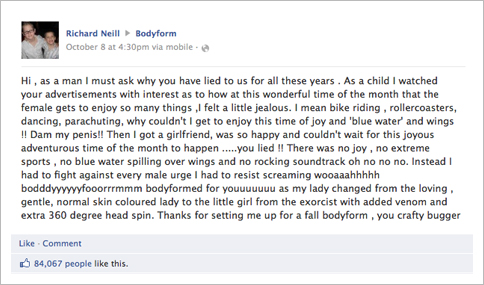
So when funny-but-somewhat-truthful young Richard Neill posted this hilarious but negative comment about their products (maxi-pads) and how periods aren't nearly as happy as Bodyform's previous ad campaigns would have one believe, most companies would either delete the comment altogether, or their social media team would post a basic canned response and that would be that... 

But instead, Bodyform (or rather their marketing agency, Carat) came up with a brilliant and poignant rebuttle post... but not just a post! Their response was in the form of a full-scale production video shot with "CEO" (aka Actress) Caroline Williams responding to Neill's initial comment... which in and of itself had gone viral with over 85,000 people liking the comment alone! 

Here's what Bodyform had to say in response:


The response itself has gone viral with over 3 MILLION views on YouTube. I know that I myself had never heard of Bodyform or it's products (I believe that it is a UK-based brand) but since this story and the video has gone viral I'm completely aware of them. I'm certain that Carat is going to win some sort of media award for this what can only be called a stunt, but is really a moment of epic genius and great timing!

Suffice it to say that this is a great example of what you SHOULD do if someone is trashing your brand! As the old adage goes "All news is good news" the same goes with social media, sometimes what may be construed as negative or silly can be just the right thing for your brand to go viral, so consider that next time someone has something less-than-stellar to say about your business or enterprise!

Until next time! See you on the twittersphere!


Friday, November 2, 2012

Keeping Your Kids Safe on Social Media

The internet was designed to browse porn.
There, I said it. 

Well, actually, first it was designed to send information from one university to another via a "web" of communication, but as soon as those nerds figured that out their next top priority was porn.

But the internet has evolved since then... like most humans the internet has a soft cuddly side also. There are plenty of ways that you can enjoy yourself without venturing into the "dark side" and the same goes for your little nerds, too!

"Explain that using the internet is just like driving a car or going
 out with your friends alone, you have to be responsible and you
 have to behave in a trustworthy manner."
(Source)
We know the internet has become a place for entertainment and education for all ages, and we know how to stay away from the dark side, but our kids may not. So how do we keep those little eyes away from things they're not prepared for, or even worse, away from people who wish to prey on them?

Here are a few important measures to take to ensure your child's safety when browsing the web:

(after the jump!)