Showing posts with label SoMe for Big B. Show all posts

Tuesday, October 1, 2013

Facebook's New Pages To Watch Section


Have you seen this new section in the admin area of your Facebook Page yet?
Facebook has rolled out yet ANOTHER great new feature for Small to Large Businesses and Communities, and this one is going to be a hit!


This allows you to track (or watch) the progress of other pages and compare it with your own page's insights. 

Friday, August 9, 2013

Building a Digital Culture in Your Business


It’s safe to say that not everyone, perhaps even no one initially, is interested in using social media to promote a business. In fact, it can be terribly difficult at times to establish a digital culture in a place of business for some managers and owners. Often time’s customers and employees aren't inclined to participate because of a lack of awareness, or maybe it’s an aversion to technology. The only real way to achieve peak performance, both socially and digitally, is to have complete participation within the ranks. Creating this culture, however, isn't an easy feat. It takes training, encouragement and proven results to really get off of the ground.

In the dawn of social media and sharing many business owners were afraid to allow employees to use social sites at work. They were concerned for overall productivity and of course, sharing trade secrets or guarded information. Many government agencies and large companies, especially those with high security levels, still do not allow access to sites like Facebook or Twitter across the board. Occasionally employees are even required to lock their phones away before their shift to ensure that private information remains that way. There isn’t much you can do about that, when dealing with highly secure information, but for the small to midsize business, or businesses that don’t deal in protected data, the days of the security walls and social bans are long gone.


TRAINING & BEST PRACTICES

Many Fortune 500 companies now offer training to employees on best practices around social media and you’re hard pressed these days to come across a new employee manual that doesn't offer up some sort of regulations around social activity. Whether you’re trying to protect your brand’s image or your client’s information, having a best practices for employees surrounding social sharing is just… well… a best practice!

When it comes to encouraging employees to use social media in a business perspective, however, things can still be quite unclear. Most companies, especially smaller ones, do not monitor employee activity online. HR and Marketing Depts. rarely offer training on how employees can offer assistance in company growth online, and they most often don’t encourage it. This, in my opinion, is the first real mistake.

On one hand, you’re not observing employee activity and ensuring they’re standing up to the rules that have been set in place. An occasional Google of employee activity isn’t nearly effective enough in ensuring they’re meeting your standards. When a customer offers up a negative opinion on your business or services its bad enough, but when an employee does it? There could be no coming back from that!


NEGATIVE vs. POSITIVE EMPLOYEE SHARING

We see stories every day of employees posting photos and videos of themselves, or their place of employment, shining a light on poor working conditions or management. Often this activity results in the immediate termination of an employee, sometimes reasonably and sometimes not. Rarely do we see upper-level management using such an occurrence as an opportunity to review their own practices and determine why the employee would risk their job just to share something of that nature online. Either they are disgruntled over poor working conditions/treatment, or they’re inefficiently (if at all) trained on appropriate online behavior as an employee. Both of these fall under the management umbrella and without being addresses, could occur at any time in your business.


(source)
INCLUDE YOUR EMPLOYEES IN YOUR DIGITAL MARKETING EFFORTS

Beyond the obvious need to train employees on best-practices around workplace social sharing, it’s also increasingly important to include them in the digital marketing plans for your business.
Offering training, info sessions and employee events that can be utilized as a way to encourage positive employee sharing online is a great way to start!

Here are some ideas as to how you can begin to create a (positive) digital sharing culture in your workplace:


  • Encourage employees to take photos with customers happily buying product. Offer up a hashtag that is company specific and show them where they can post them online (with customer approval, of course!)
  • Create a Private Facebook Group for employees only, where you can include shareable content to be posted from your social sites onto others, as well as directives and questions/polls. This is a great way to gather information and see who is participating!
  • Share your digital roadmap/objectives with employees! Give them an opportunity to join in on the work. Many hands make light work and many employees create a larger reach!
  • Embrace newer social sharing sites like Instagram, Tumblr, Google + and encourage employees to help carve out a new audience there.
  • Offer incentives to employees who achieve certain goals socially. Including: Getting likes on your facebook page from their friends, encouraging contest participation, getting X amount of views of a workplace-video online. Not all incentives need to be monetary; some can align with workplace rewards like events or product.
  • Create online profiles for your employees on your website and ask them to participate in sharing their own personal pages. Utilize little-known facts, fun ideas and games to create high-content pages or blog posts about them. Encourage online sharing across all social media.
  • Encourage check-ins online on sites like Foursquare and Facebook, especially if there is low customer participation.
  • Hire a photographer to do employee portraits. What would an employee rather share than a particularly great photo of themselves? They’ll be grateful for an opportunity to have a professional photo taken at no cost to them and likely share them in an exceptionally positive light.
  • Create events (online and offline) that especially encourage digital sharing. Ex. Offer to have a bi-weekly/monthly movie night IF employees share X amount of posts every week, and then get them to garner votes online for what movie should be presented.
  • Ask employees to brainstorm ideas for marketing efforts, like blog posts, photo sessions and product displays. If they’re putting effort into the conceptualizing and execution, they’re far more likely to share the finished product online!


I hope that you’ll be able to effectively deploy some of these ideas in your own workplace! Please let me know your results!

The #Social Mom

Tuesday, July 30, 2013

Social Media Do's and Don'ts: An Un-Official List


In the world of social media there are a bevvy of unspoken (or oft-spoken, in some cases) rules. Some are designated for users en masse and some are specifically for brands.

Just like the rules we were taught as children (always hold the door open for strangers, don't put your elbows on the table, say "excuse me" after your sneeze) these rules exemplify that we, as social networkers, recognize that other people inhabit these planes and we should be respectful of them.

Here's a list of the big Do's and Don'ts you should keep in mind:


Friday, July 26, 2013

My Facebook Page Reach Has Declined! Guess What? It Doesn't Matter!


So your Facebook Page's reach has dropped... not as many of your fans (and even less non-fans) are seeing your posts! It’s not the end of the world, I promise!

Lately I have seen many Facebook Page owners (mostly bloggers and small businesses) complaining or posting about the decline in the reach of their posts. Although this may have an initial significant impact in your growth, it doesn't impact the way your fans interact with your page.

Here are five things you can try, or remember, when it comes to your Facebook Page:

Saturday, June 1, 2013

What is Klout and how does it work?

What is Klout | How Does Klout Work | The Social Mom | thesocialmom.net


You may have been perusing Twitter and noticed that people are acknowledging something called their "Klout Score" and thought to yourself, what is this exactly? Or maybe you're a business and you're considering putting a perk online to get the word out about your services. Either way, if you're wondering about Klout, you've come to the right place!

Klout is an online start up that takes all of your social media activity and determines your online influence based on how many people follow you, friend you or fan you, and how well your posts do based on those numbers. The algorithm is a bit more complicated than that, but suffice it to say that your Klout Score is a number that indicates what your overall influence is online. The more you create impressions and engage, the higher your Klout Score.

Monday, May 20, 2013

What I Learned from #AutoBootCamp

I spent the better part of last week at #autobootcamp in Philadelphia, networking and doing workshops focusing on digital technology in the automotive industry.

I met quite a few great people, and got up close and personal with some great new technologies for advertising, marketing and creating content on social media. One of the best things I learned was that I'm not so far behind the curve. That's a pretty good feeling!

I've only been involved in the digital marketing field in the automotive industry for a few months, but I'm already loving it! There's never a dull moment, that's for sure! Automotive dealerships and manufacturers are always finding new, great ways to participate in new fields of marketing. Although many are afraid to take the leap into the digital realm, many are also leading the stride when it comes to advertising, google adwords, facebook marketing, twitter marketing and advertising and much much more.

Wednesday, May 8, 2013

When Social Media Attacks: How to Calm The Storm

source
Although there are 1,000,001 GREAT reasons to use social media to your full advantage as a small or large business or brand, one of the things you HAVE to have on your radar and plan for is a viral attack.

In social media, especially as brands we are largely dealing with customers... most of whom are happy to provide stellar feedback and recommend you when people are looking for suggestions. THIS is why social media is such a massive aspect of marketing today and a must-do when it comes to launching word of mouth campaigns.

There is a flip side, though. A dark, scary place where one unsatisfied customer, however legitimate or radical their concerns may be, can negate all of the work you've done to grow a following.

In the "days of yore" it took contacting media outlets, constant negative spin or a terrible tragedy to send a businesses' marketing efforts into a tail spin. These days, one unhappy customer with the right "friends" or "followers" can turn your whole business upside down.

Wednesday, February 6, 2013

Contests and Giveaways

Did you know that running native contests on your Facebook page is against their Page Terms & Conditions? Every single day I come across pages running "Like this!" and "Share that" contests, within their posts. This type of contest is against Facebook Policies and could potentially have your page shut down. The way Facebook wants people to run contests is through developer apps like Rafflecopter, Offerpop or Shortstack, to name  a few. Basically, what that means is instead of using "organic" facebook actions like "Liking", "Sharing" and "Commenting" on pictures/posts, you are taken to a built-in tab on the page where fans and entrants can do the exact same actions, but without breaking the rules.

The additional benefits of this type of app is that you can "Fan Gate" it, which means that before someone enters your contest, they're required to like your page to see the entry form or rules. This can significantly jump your page numbers if the incentive is good enough.

Here's some more information on how to create contests and giveaways via Facebook:

One of the fastest (and best!) ways to increase your Facebook traffic and "likes" is to utilize a built-in contest app. There are the "build it yourself" kinds like Rafflecopter (which now integrates directly with facebook pages!) and then there are the "pre-built" kinds like the campaigns offered by Offerpop.


Did you know that Offerpop gives you the first campaign you run for free?!

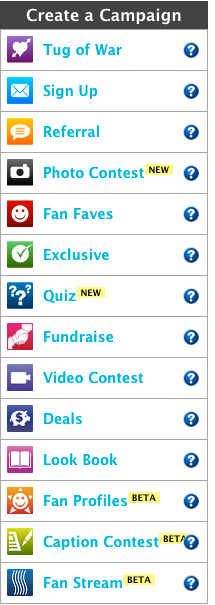
It's a great way to try a new format for contests and try your hand at the program, too. Quite easy to use, their system allows you to pick from a wide variety of campaign "types" including Photo Contests, Referral Programs and more!

Each campaign is pre-built (it even gives you examples and dimensions for the graphics needed to run the campaign!) and you can easily select which page you want to run it on with a drop down menu.

If you're like me and support multiple pages every week it's a great option for running multiple campaigns simultaneously.

And the best part? Offerpop has already worked out all of the kinks, working within the Facebook Rules and Regulations and creating coherent campaigns that give real-time analytics.

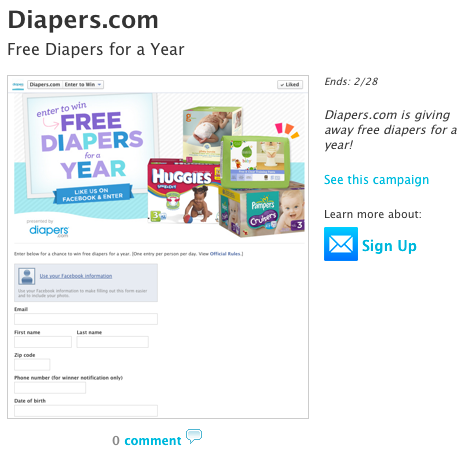
An example of one of their great campaigns is the "Diapers.com" campaign. Allowing anyone who signs up to enter to win Free Diapers for a Year, this contest drives participants to the facebook page and is a simple "Sign Up" style campaign. Easy for the user to enter and can return a lot of results.


Who wouldn't want the chance to win FREE diapers for a year?

One of my go-to apps for running contests (especially on blogs and websites) is the Rafflecopter widget. This allows you to create a variety of different qualifying ways to enter a contest, the whole thing is pre-coded but allows you to customize the app depending on the contest that you're running. 

I am currently running a contest on my lifestyle blog Crawl The Line for the month of February called 7 Days of Giveaways! For each day the contest is running (7) there is one prize (a piece or set of jewellery) to be drawn at the end of the week. This allows me to cross-market with a sponsor, create a widget that's built directly into my blog (no going elsewhere to sign up for the contest!) and integrates across a variety of different platforms (Pinterest, Facebook, Twitter and Blogger -- plus many more!) their basic (unpaid) version of the app is totally useable as many times as you want, and if you want even more great options (like real-time analytics) you can subscribe to their service for a small (or large, depending on how much you need to see) monthly fee.

This totally isn't a sell for Offerpop or Rafflecopter, but I do have to say they are both great options for any campaign you want to run in the social sphere!


Friday, November 16, 2012

Make Time for Social Media


I was at a tradeshow this past weekend and was running a pretty cool and effective social media contest! 

The concept was simple: Follow my company's social media page, tweet about it and I would tweet you back to come pick up your prize: A $10 Starbucks card! 

(source)
Very big engagement for very little work and spend (overall!)

Although there were many people hopping on the bandwagon from tweets and posters scattered around the conference, I made sure to tell everyone who stopped by about the contest. In the days where tradeshows and conferences have become a huge swag-grab for so many, having a real engagement can be difficult. Most attendees are there to trick-or-treat and that's about it. They don't want to hear about your offering and they certainly aren't going to stand around and chat about it with you. So, the issue becomes not about impressions, we make plenty of those, but about engagements!

By enticing the attendees to follow us on Twitter or like the Facebook page, what it actually does is give them an opportunity to learn about our company, not on the tradeshow floor, but later, in their news feeds. It also provides us with insight into what they're thinking about and the ability to engage with them later.

Conferences can be an excellent example of where to find your target market. Most of the people who attend them already have ties in the industry you're aiming for, and if they aren't currently in a decision making role, they could be in just a few years. So, by utilizing a contest campaign wherein they have to follow your page or feeds, it allows you into their psyche every now and again. Regular impressions, and hopefully, down the line, more engagement.

Now one thing I heard a lot throughout the day was "Oh I don't use twitter." or "I deleted my facebook account!" and although I'm sure a few of them just had that "don't advertise to me" barrier up, I don't doubt that it was true in many cases. Unfortunately they're missing out on the big picture and we're missing out on their engagement!

But it did make me think, even our own CTO (Chief Technology Officer's) keynote was based on the huge influx of social media use in today's market and how that impacts the IaaS and IT-Managers running businesses. But even he, the guy GIVING the keynote, isn't an active social media user. He acknowledged it's importance in the marketplace, but can't find time in his schedule to actually engage.

It is my full time job to be dedicated to engaging on my company's behalf, which is fine and dandy, but at the end of the day if our company had more names and faces living in social media, chatting about our offerings, it would make us that much more effective overall. It's definitely something I'm working on, getting others to engage around our branding and just technology in general.

So many small business owners and large enterprise executives have a difficult time making time for social media. And it's a shame, because that's where we can truly engage with others. Not advertise to them, but talk to them. Get into their heads and learn not only what we're doing right, but what we could be doing better and what we should be doing next year. Keeping up with the fast pace at which technology grows isn't easy, so why not tap into a market where others are keeping up on it for you? Cultivate lists and followers who can tell you what you need to know!

After all, social media isn't just about advertising, in fact, it's rarely about advertising. The true experience of social media lives at the engagement level and it's an opportunity for us to learn more about our businesses and our demographics without ever having to leave our offices or apartments or cars. Using it as a true empowerment and engaging with those who can offer some true insight into our growth potential is only one of it's major benefits, but it's certainly not one to be overlooked!

So here's your homework: Dedicate at least an hour EVERY DAY to just engaging on social media. It will take days, weeks, probably even months, to get it right. But once you've learned to commit yourself to the engagement so much information and insights will be flowing to you it will be impossible to deny it's effectiveness!

Schedule it in your calendar, around your existing work day. Employ your coworkers to do the same. If you want to increase your brand awareness online the key is to increase your activity first!


Thursday, November 15, 2012

Facebook: Groups vs. Pages vs. Accounts

Everyone (okay, okay... Almost everyone....) uses Facebook! Over 850 MILLION accounts are used monthly and we do it for everything... did you know that these days many people will put their search terms into FACEBOOK search before even heading over to Google?

So there's no question that we all use it but that doesn't mean we all know HOW.

In so many instances I've been hired on to manage a Brand's facebook content and realized that they've been operating their brand visibility through a Facebook ACCOUNT!

That's basically like going to the bank to rent your movies! Okay, maybe not that bad, but I mean, c'mon!


So, let me explain the difference, the very BASIC difference between a Facebook Account, Page and Group.


1. Facebook Account
This is owned by a user. This account has a profile page, can write notes, can see people's feeds that they are friends with and can engage on basically every level. You can like pages, connect with your mobile devices and even connect it with other social media streams (twitter, foursquare, instagram etc.)

These accounts can have very low to very high privacy settings to help determine how much or how little access you want the outside world to have.

What is this meant for? This is your online existence, your profile..  this is meant for People.


2. Facebook Page
A Facebook page is created by a user, usually to represent a brand, person or community of some kind. People access this page by "liking" it and for most intents and purposes you would want it to be open and available to anyone who uses Facebook.

Just like on your Account Profile, you have a profile page that anybody can see. It has your "about" information as well as a timeline where you can post Status Updates, Photos, Events and Milestones. The difference is that you can have more than one person "manage" or "create content" for this page and you don't "friend" people like with your account. In order to get someone to follow you page and it's engagements they must first "like" it.

Once again it can be cross-marketed with other forms of social media like Blogs, Twitter, Instagram and much more!

Pages can create events and promote other pages, as well as being sub-pages to other affiliated pages like organizations or communities.

What is this meant for?  A FB Page is meant for Sharing and Liking. It's meant to engage with fans and followers on a regular basis but is seperate from an account in the sense that it's more for the output of information than cross-information. This is ideal for Companies, Small Businesses, Artists, Brands, Figureheads, Musicians/Bands, Fictional Characters, Blogs and more! (Basically anything that isn't a [famous] human being.


3. Facebook Group
Just like any other group, a Facebook Group is a community. Within that community there are people (with Facebook Accounts) that can share information. Any managers of Facebook Pages can also share information to a group via the sharing button! -- The difference is like an account you can control overall visibility across the facebook platform, but like a Page, you can share and people can choose whether to or not to like it.

Groups can make events just like accounts and pages, however once again there are privacy options that let group administrators manage who can see/join/attend said events.

Groups are there to generally post about certain subjects related to the group activities or culture.

What is this meant for? A FB Group is there to allow people who are part of a community (whether public, closed or private) to communicate in one open forum. This would be ideal for members of a team, organizations, people looking to meet other like-minded people or businesses working in similar industries.


Got it? Good! 

I hope you enjoyed this brief introduction into the Rules of Facebook! Do you have a facebook account, page and/or group? Do you use them effectively?

Monday, November 5, 2012

SoMe for Big Biz: You're Doing it Right


Sometimes using social media, even when it comes to extra-large enterprises, is to see the humour in engagement as opposed to the negativity. When you're dealing with consumer products, on (more than a few) occasion(s) people are going to have something less-than-positive to say about your product... take the #McDstories fiasco for instance... so the best thing to do in that situation is turn it on it's head!

An excellent example of a company (and/or their agency) doing just that is the Bodyform Facebook Win

You see, when you have a Facebook Page, you have a wall, and with a wall you're opening yourself up to anybody posting anything. Now, you can monitor and delete whatever you want, but some people would see that as censorship and since social media is all about free speech and free will to be as socially engaged or un-engaged as we'd like, censoring the crap out of your page isn't going to do anything but annoy your "fans".


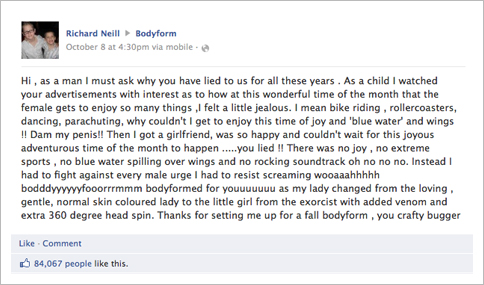
So when funny-but-somewhat-truthful young Richard Neill posted this hilarious but negative comment about their products (maxi-pads) and how periods aren't nearly as happy as Bodyform's previous ad campaigns would have one believe, most companies would either delete the comment altogether, or their social media team would post a basic canned response and that would be that... 

But instead, Bodyform (or rather their marketing agency, Carat) came up with a brilliant and poignant rebuttle post... but not just a post! Their response was in the form of a full-scale production video shot with "CEO" (aka Actress) Caroline Williams responding to Neill's initial comment... which in and of itself had gone viral with over 85,000 people liking the comment alone! 

Here's what Bodyform had to say in response:


The response itself has gone viral with over 3 MILLION views on YouTube. I know that I myself had never heard of Bodyform or it's products (I believe that it is a UK-based brand) but since this story and the video has gone viral I'm completely aware of them. I'm certain that Carat is going to win some sort of media award for this what can only be called a stunt, but is really a moment of epic genius and great timing!

Suffice it to say that this is a great example of what you SHOULD do if someone is trashing your brand! As the old adage goes "All news is good news" the same goes with social media, sometimes what may be construed as negative or silly can be just the right thing for your brand to go viral, so consider that next time someone has something less-than-stellar to say about your business or enterprise!

Until next time! See you on the twittersphere!